
How to Solve Sitecore Azure Log Clean-Up Agent Issue?
Published: 20 April 2023

Logging is a crucial aspect of maintaining a Sitecore system, as it helps identify issues and resolve them.
Sitecore uses log4net settings to manage the logs in the CMS and frontend website, and tracks DEBUG, ERROR, INFO, and WARN level errors.
The logs are typically stored in the App_Data\logs folder, and Sitecore provides a clean-up agent to remove old logs and free up disk space.
Please refer the below given clean-up agent settings which Sitecore has provided by default:
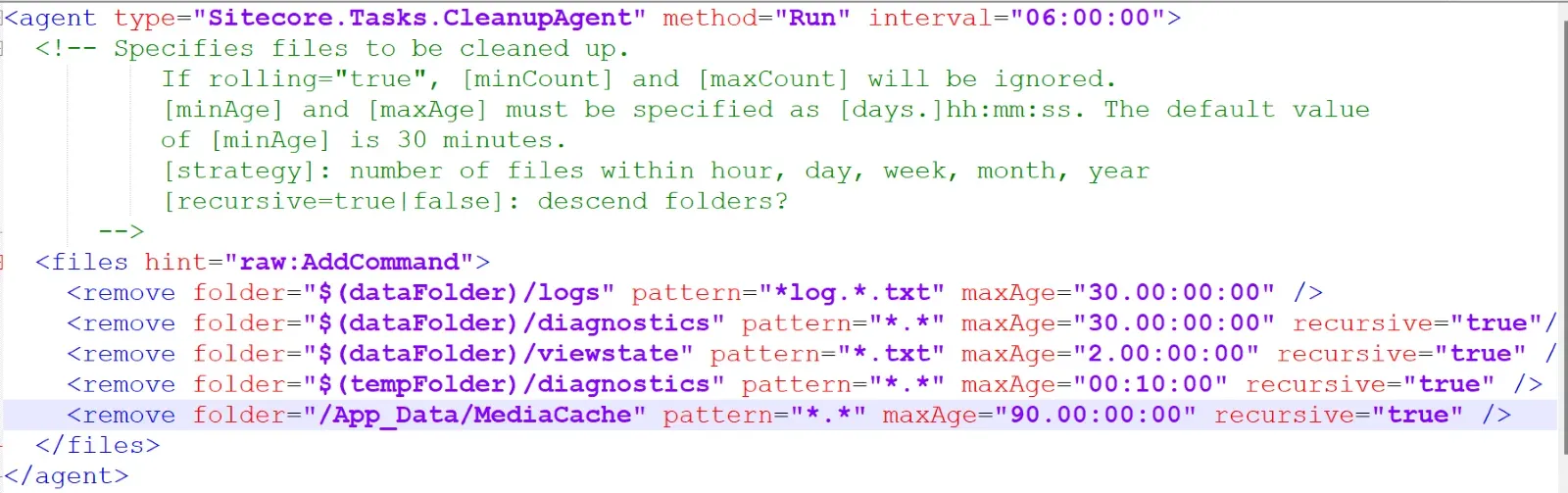
However, when hosting Sitecore in Azure, the log files may have a different naming convention, such as azure..txt. Additionally, if Sitecore creates a file with a number appended to the end, such as log txt.number, the default clean-up agent may not remove it because the pattern does not include the number suffix.
Solution:
Please refer below solution to clean up the azure logs in your instance:
For removing all logs file, you have to update the above configuration with below settings:

To solve this issue, a patch file can be created to update the clean-up agent settings.
For Azure, a new agent has been added specifically to clean up the Sitecore Azure log files, as the default settings do not clear them.
The maxAge value can also be updated to retain only the last 7 days of logs, to avoid disk space and backup issues in the Azure environment.
Conclusion

Maulik Dudharejia - Co-Founder & GGO | ADDACT
Sitecore MVP 3X || Digital Transformation Strategist || Marketer
As Chief Growth Officer at Addact, he drives business growth, digital transformation, and strategic innovation initiatives. With over 12 years of experience in technology consulting, digital experience platforms, and enterprise solutions, he helps organizations accelerate their digital journey through modern CMS, AI-powered experiences, and customer-centric growth strategies. His focus is on creating scalable business value, strengthening partnerships, and enabling long-term client success.